
Contract Manufacturing for Injection Molded Plastic Products in North America
(800) 824.0607
Choosing the best Smart Parking System in 2026 means matching technology to the way a business actually operates. A hotel may need smooth guest access and clear directions to open spaces. An office building may care more about permits, peak-hour traffic, and monthly reporting. At a retail site, drivers often want to find a space quickly and pay without confusion. The right solution should address these everyday needs, not just offer an impressive dashboard.
This guide compares systems through practical criteria: occupancy detection, booking and payment options, access control, integrations, reporting, and support. It also considers how well a platform works during a busy arrival period, when several cars reach the entrance at once. Accurate data matters. A sensor that marks an occupied bay as available can frustrate drivers and staff alike. Yet no system performs perfectly in every setting. That is the catch.
Businesses should assess installation requirements, ongoing costs, staff training, and data protection before making a decision. Ask vendors how their equipment performs in your site conditions, what happens during a network outage, and how quickly support responds. A live demonstration can help, but test it against real workflows where possible. This comparison explains the trade-offs behind leading options and highlights questions worth asking before signing a contract. The best choice is not necessarily the one with the most features; it is the one that reliably solves the parking problems your customers and employees notice.
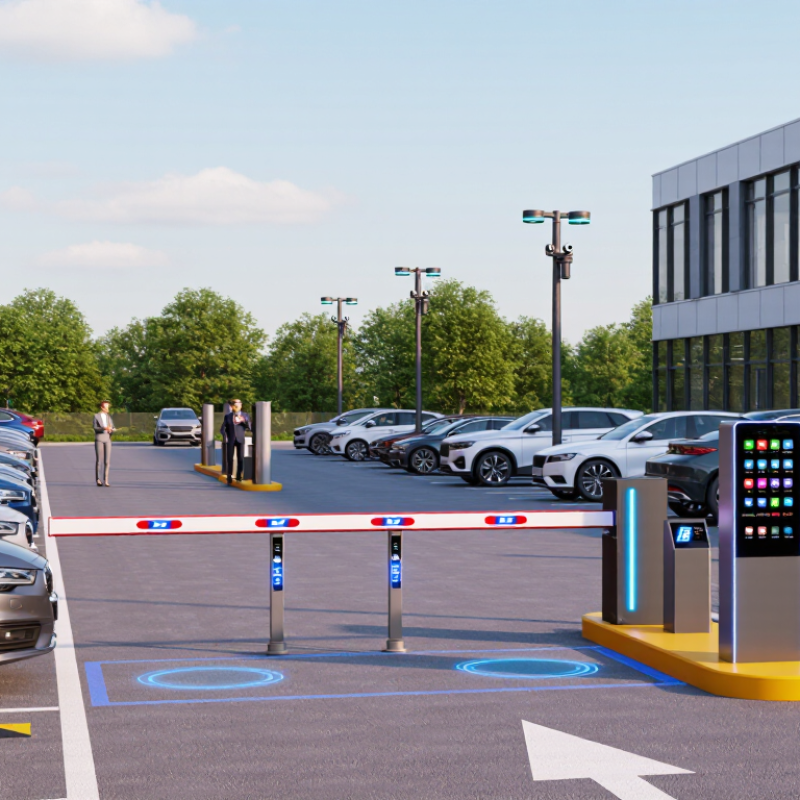
Best Smart Parking System in 2026 for Businesses
What Defines a Business-Grade Smart Parking System in 2026
A business-grade smart parking system is more than a map of green spaces. It connects bay sensors or camera analytics with reservations, payments, access control, and a live operations dashboard. It should also keep working when a sensor drops offline. INRIX’s 2017 U.S. parking study estimated that drivers spent 17 hours a year searching for parking, at an annual cost of about $345 per driver. This is an older benchmark, not a 2026 forecast, but it shows why accurate occupancy data and clear wayfinding matter. Track entry-to-space time, failed payments, sensor uptime, and booking conflicts—not app downloads alone. Set service targets before purchasing.
Tips: Pilot the system during a busy morning and a quiet evening. Compare sensor counts with manual spot checks. Ask staff to test a stuck gate, a payment refund, and a data export. Check access controls, encryption, retention settings, and who owns the system’s data interface. Keep a human fallback. Edge cases will happen, and a polished dashboard can still hide inaccurate curbside counts.
What Defines a Business-Grade Smart Parking System?
These example planning targets highlight key operational measures: system availability, occupancy detection accuracy, payment completion, and data synchronization. They are illustrative benchmarks, not results from a specific provider or industry-wide survey; set contractual targets according to each site’s requirements.
A business parking system starts with one plain question: is this bay occupied? In-ground magnetic or ultrasonic sensors detect vehicle presence. Overhead cameras classify spaces from images. Each method has blind spots. A delivery van can hide a camera’s view, while resurfacing may affect sensor readings. The controller timestamps each detection and sends status to signs, apps, or a management dashboard. Small details matter.
The need is measurable. INRIX’s 2017 Global Traffic Scorecard estimated that U.S. drivers spent an average of 17 hours a year searching for parking, at a cost of $345 per driver. That figure is not a forecast for every property, but it shows why stale occupancy data can waste time. Managers can compare sensor counts with brief manual checks during shift changes, then investigate bays that repeatedly disagree. One missed detection should not be treated as ground truth.
For 2026 planning, match the detector to the site. Ceiling cameras can monitor structured garages, while individual sensors may suit exposed outdoor bays. Entry and exit counts provide a useful cross-check. When occupancy rises, software can direct arrivals toward open zones, reserve loading spaces, and alert staff to blocked bays. It helps, though it cannot fix confusing signs or a poor layout. Review false readings regularly; field conditions change.
A practical comparison of common occupancy-detection technologies and the management functions businesses can use to operate parking facilities.
| System or component | How it detects or manages occupancy | Typical output | Suitable applications | Key considerations |
|---|---|---|---|---|
| In-ground magnetic sensor | Detects changes in the local magnetic field caused by a vehicle’s metal body. Sensors are installed in or on the pavement at individual spaces. | Space-level status, usually shown as occupied or available. | Outdoor lots, curbside spaces, and facilities needing space-by-space guidance. | Installation may require pavement work. Performance can depend on placement, vehicle type, and site conditions; battery and network maintenance should be planned. |
| Overhead ultrasonic or infrared sensor | Measures reflected sound or light from the area beneath a sensor mounted above a parking space. | Space-level occupancy status; some installations also use indicator lights to guide drivers. | Structured garages and covered parking where sensors can be mounted above each space. | Requires suitable mounting positions and coverage. Dirt, obstructions, ceiling height, and environmental conditions can affect readings. |
| Camera-based computer vision | Analyzes video images to identify vehicles in marked spaces or count vehicles in a monitored area. | Space status, zone-level counts, or both, depending on camera coverage and software configuration. | Garages and lots where one camera can cover multiple spaces or where visual monitoring is already in place. | Lighting, weather, occlusion, camera angle, and markings affect detection. Set appropriate privacy controls, access rules, and retention policies. |
| Radar-based detection | Uses reflected radio waves to detect vehicles within a defined coverage area. | Space or zone occupancy, depending on sensor design and installation. | Sites seeking non-contact detection, including some outdoor or covered environments. | Coverage and accuracy depend on sensor placement, nearby objects, and configuration. Validate performance on-site before deployment. |
| Entry and exit counters | Counts vehicles passing a monitored entrance or exit using cameras, loops, or other vehicle-detection equipment. | Estimated total vehicles inside a lot or facility. | Facilities that need overall capacity information rather than status for every individual space. | Counts can drift if vehicles use unmonitored entrances, tailgate, or move between zones. Reconciliation methods may be needed. |
| Occupancy management platform | Collects sensor or counter events, applies facility rules, and presents current status to operators and connected signs or applications. | Live occupancy views, zone availability, alerts, and operational reports. | Businesses managing multiple parking zones, sites, user groups, or changing capacity rules. | Check integration support, network resilience, data access controls, and how the system handles missing or delayed sensor updates. |
| Guidance, access, and allocation tools | Uses occupancy information and business rules to direct drivers, manage access, or reserve spaces for defined user groups. | Space directions, availability messages, access decisions, or reservation status. | Campuses, workplaces, commercial properties, and facilities with visitor, accessible, or reserved parking requirements. | Rules should reflect local accessibility requirements and site policies. Keep signs and digital availability messages synchronized with actual conditions. |
Selection note: There is no single detection method that is best for every facility. Sensor coverage, installation conditions, connectivity, maintenance needs, privacy requirements, and the desired level of detail should be assessed at the site. Detection performance varies by product, configuration, and environment.
When comparing a business parking system in 2026, start with how it handles daily traffic, not just its feature list. Check whether cameras, sensors, or entry terminals can report space availability accurately in rain, glare, and busy periods. Ask how the system handles a failed camera or network connection. A simple fallback can prevent a queue from stretching onto the street.
Review payment choices, permit management, and reporting together. Managers may need to separate visitor, staff, and reserved spaces, then see occupancy by hour or location. Confirm that the system can connect with existing access controls and accounting tools. Security matters too: ask what data is collected, who can access it, and how long records are retained. Small details matter. A clear support process is useful, though no system eliminates every operational headache.
Tips: Test a live demo with realistic scenarios, such as a full lot, a lost ticket, and a temporary closure. Compare setup and ongoing costs, including maintenance and training. Ask for references from businesses with similar traffic patterns. If a feature sounds impressive but staff cannot explain how they would use it, pause and investigate further. The best fit depends on the site; a compact office lot may need very different tools from a busy retail property.
A smart parking system should fit the way a business actually operates. Retail centers often need quick turnover, clear availability signs, and simple payment options for short visits. Offices may benefit more from staff permits, visitor reservations, and reports showing which spaces sit unused. Hospitals need dependable access for patients and shift workers, even during busy arrival periods. One system rarely serves every site equally well.
Look beyond the dashboard. Check how sensors perform in rain or glare, how quickly attendants can correct a mistaken reading, and whether the software connects with existing access controls. Small details matter. Test it on-site. A pilot during the busiest hours can reveal queues, confusing signs, or inaccurate occupancy counts before a full rollout. Ask vendors for documented uptime, support response times, and clear data-retention practices. No setup is flawless: license-plate reads can fail, and drivers may ignore availability prompts. Plan for manual overrides and staff training, too. The right choice balances reliable detection, practical support, and a layout customers can understand at a glance.
A business should compare the full cost of a smart parking system, not just the price of sensors. Budget for installation, network upgrades, software subscriptions, staff training, and ongoing maintenance. A garage with weak connectivity may need extra access points, while outdoor spaces can require weather-resistant equipment. Ask vendors to separate one-time and recurring fees. Small pilots help.
Before deployment, map how drivers and staff use the site during a typical week. Record occupancy by hour, entry delays, and the time employees spend answering parking questions. Then test a limited area, such as one floor or 40 spaces. Check whether readings match manual counts, especially during shift changes and bad weather. Imperfect data is common at first. Plan who will review alerts and handle outages; technology still needs an owner.
Business value should be measured against that baseline. Useful indicators include reduced time spent searching, fewer manual checks, improved space turnover, and more reliable access for visitors or employees. Estimate savings conservatively, and include the cost of downtime or inaccurate guidance. If the system cannot show clear operational gains within a defined review period, reconsider its scope before expanding. Ask how data is stored, who can access it, and how long it is retained.